
Share the sign-up link: WhatsApp, Facebook, newsletter and poster
The season launch kit gives you ready-to-paste posts, a newsletter paragraph, an A4 poster with the QR code and a slide.
Examples use Bluegum Valley JFC, a made-up club. About the sample club
Getting families to the link is the hardest part of the first week. Open a roster and go to Share: everything you need is in the season launch kit.
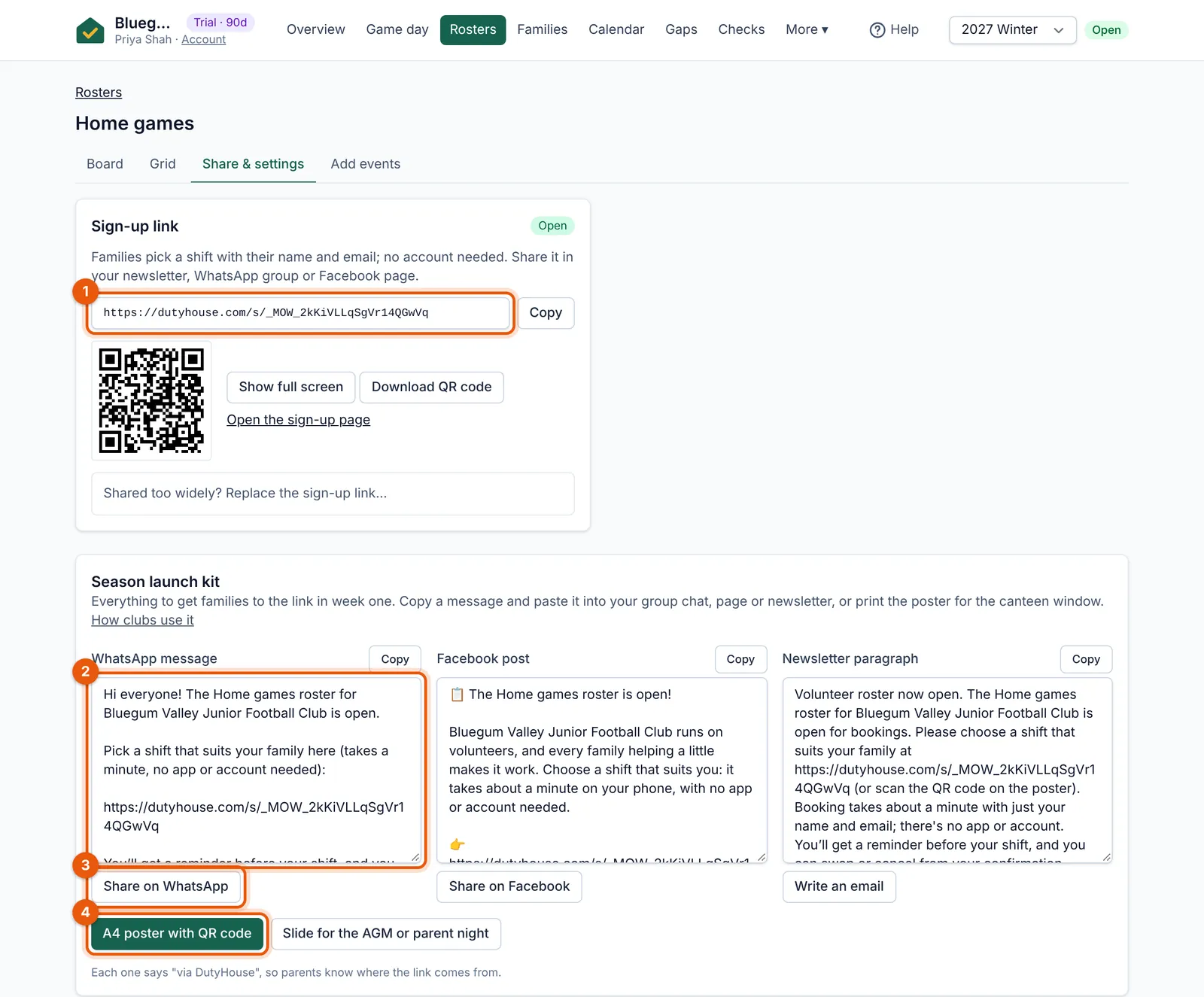 (full size, opens in a new tab)
- The sign-up link families use. Copy it, or show its QR code.
- A WhatsApp message ready to paste (Facebook and newsletter versions sit beside it).
- Share on WhatsApp opens WhatsApp with the message filled in.
- Print the A4 poster with the QR code for the canteen window.
- A WhatsApp message and a Facebook post, ready to paste, with share buttons.
- A newsletter paragraph for the school or club newsletter.
- An A4 poster with the QR code, for the canteen window or the clubhouse noticeboard.
- One slide for the AGM, parent information night or presentation day.
When Priya pasted the WhatsApp message into the Under 9s group, 23 families booked that evening. Copying the link ticks “Share the sign-up link” on the overview.
Tip: Shared too widely? You can replace the sign-up link. The old link and every printed QR code stop working straight away; bookings already made are kept.